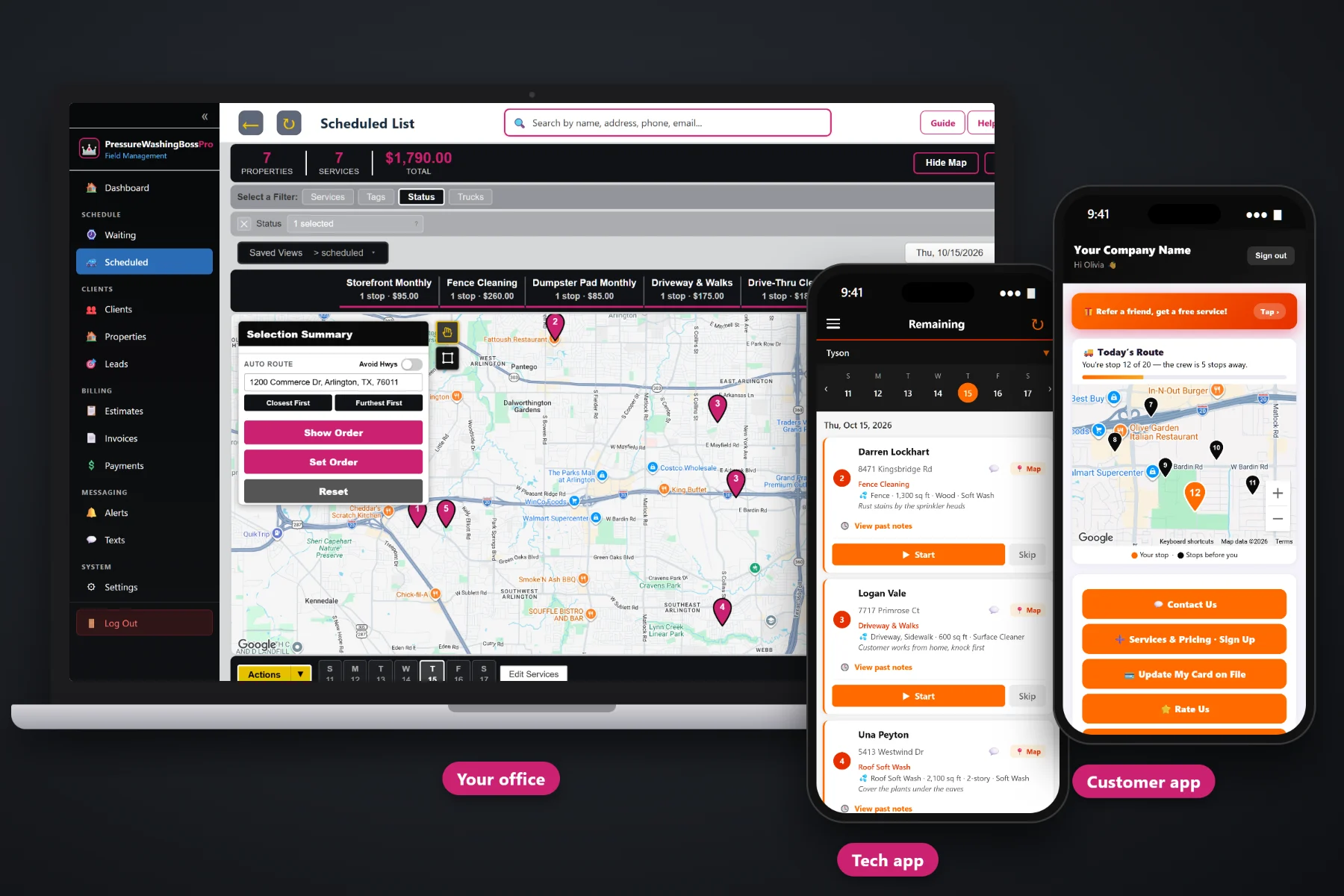
A pressure washing company runs on details: which surfaces are on the job, how many square feet of driveway, a 1-story ranch or a 3-story with a steep roof, vinyl or stucco, soft wash or surface cleaner, and where the spigot is. PressureWashingBossPro keeps those details on every job, measures from satellite, brings recurring visits due on their own, routes each rig, puts the day on the crew's phone and gets the card charged when the wash is done.
Plans start at $59/month, and the crew app, the customer app, estimates, texting and billing come with the platform, not as add-ons. For the full picture of how it all fits, start at PressureWashingBossPro, then use the guides on this page to dig into each piece.
Surfaces, square feet, stories, siding and method under the address, from the estimate all the way to the crew's phone.
Measure driveways, roofs and fence lines from the property map and price the estimate off the numbers.
Monthly storefronts, quarterly HOA common areas and yearly house washes land on the Waiting List on their own.
Jobs by day and by rig, auto-routed from the shop, with the same order on the board and on the phone.
The customer approves online and the approved estimate becomes the scheduled job, details and all.
Complete creates the invoice and can charge the card on file. Commercial accounts can get one monthly statement.
Whoever quoted the house already knew it was a 2-story vinyl house wash plus a driveway and a back patio. PressureWashingBossPro keeps that on the job and shows it under the address on every list and on the crew's phone, so the operator pulls up knowing whether to set up the soft wash or the surface cleaner first.
You got into this trade to clean things, not to fill out screens. PressureWashingBossPro asks for a few clicks in the office and a few taps on the rig, and gives back a schedule that builds itself, customers who know you're coming and invoices that go out on their own. It runs in the browser on the computers and phones you already own.
Bring your list in by CSV import or type it in, set up your services, and add employees with a personal PIN and a rig assignment.
Measure from satellite, build the estimate from your service list, and let the customer approve it online.
Recurring visits land on the Waiting List, one-time jobs go straight to the board, and each rig gets its route.
The crew runs the day from the phone. Complete creates the invoice and can charge the card on file.
Most field-service software gives a job an address and a notes box. A pressure washing job is a list of surfaces, a square footage, a number of stories, a siding type, a wash method and a spigot on the far side of the house. Software that only knows the address leaves half of every job in your head or your text messages.
Ask any owner running a trailer rig how the week really goes and you will hear the same story: quotes scribbled on the back of a fuel receipt, a customer's gate code lost somewhere in a thread of texts, and a 2-story stucco house where nobody wrote down whether the roof was on the job or just the walls. Whether the back patio was included. Which beds need to be pre-wet. Whether the restaurant drive-thru was due last week.
That information belongs on the job, not on a clipboard or in one person's memory. When it lives in the software, any operator can run any route and the owner stops answering the same questions from the driveway.
PressureWashingBossPro keeps the customer, the address, the surfaces and the money in one place, from the first quote to the paid invoice.
Every tool here exists to get more clean surfaces done per day with fewer phone calls, fewer forgotten recurring visits and fewer unpaid invoices.
Surfaces, square feet, stories, siding, method and access notes under the address on every list.
Measure square feet and linear feet of driveways, roofs and fences right on the property map.
A live map and list of every recurring visit that has come due, colored not due, due now and overdue.
Jobs by day, filtered by rig, with set route order, saved views and printable route sheets.
Closest First or Furthest First from the shop, for each rig.
Company login plus PIN, jobs in route order, navigation, Start / Skip / Complete, before-and-after photos.
Live route map, service requests, sign-ups, invoices, card updates and online payment.
Built from your service list with job details, approved online, turned into the scheduled job.
Text customers from the office, with automatic reminders, on-the-way and arrived alerts.
Line items and sales tax, created when the job is completed, with past-due follow-up.
Charge on completion or on a schedule, or let the customer pay online in the customer app.
One statement each month for a shopping center, restaurant group or HOA, every location labeled.
Bring your customer list in by CSV; imported addresses are placed on the map automatically.
See the work done, the money billed and what is still owed.
Office logins by role, crew PINs, and employees assigned to rigs.
Start $59, Pro $89 and Crew $199 per month, with a 14-day free trial.
Most washing companies end up running two kinds of work: house washes, roofs and driveways during the day, and storefronts, drive-thrus and dumpster pads early in the morning or after close. Recurring visits come due on the Waiting List from each plan's minimum days between visits: 30 for a monthly storefront, 90 for a quarterly HOA, 365 for a yearly house wash. The office assigns jobs to a rig and a day, auto-routes from the shop, and the phone shows the same order. For the full walkthrough, read Pressure Washing Software: The Complete Guide for Pressure Washing and Soft Washing Companies.
A house wash goes better when the cars are out of the driveway, the windows are closed and the dog is inside. Automatic reminders the night before, on-the-way and arrived texts as the crew works the route, and a live map in the customer app all tell the homeowner when to expect the rig. Replies come back to the office through two-way texting, and when the job is complete the invoice, online payment and card on file are all in the customer app.
Pick the plan that fits your operation. Every plan starts with a 14-day free trial and no credit card.
Compare plans on the pricing page.
It is one place to keep your customers and addresses, quote jobs, schedule and route your rigs, run the day from the crew's phones, text customers and get paid. PressureWashingBossPro is built around washing work, so every job carries its surfaces, square feet, stories, siding, wash method and access notes.
Yes. One-time house washes, roofs, driveways, decks and fences sit alongside recurring commercial visits like monthly storefronts and drive-thrus or quarterly HOA common areas. Commercial accounts with several locations can get one monthly statement covering every address.
The property map can measure square feet and linear feet from the satellite view, so you can measure a driveway, a roof or a fence line from the office and price the estimate off those measurements.
No app store download. The crew app runs in the browser on iPhone and Android and can be installed to the home screen. Operators log in with your company login and their own personal PIN.
Yes. Use CSV import to bring in your customers and addresses. Imported addresses are placed on the map automatically, so they show up on the Waiting List and the dispatch board.
Start is $59/month, Pro is $89/month, and Crew is $199/month. Every plan starts with a 14-day free trial with no credit card.
This page covers the software as a whole. For a closer look at scheduling, estimates, invoicing, house washing and commercial accounts, see the full PressureWashingBossPro platform overview.
Practical reading on what the software does, job details, satellite measuring, recurring visits, routes, the crew and customer apps, estimates, texting, billing, setup, switching, pricing and picking the right system.
Job details on every job, recurring visits that come due on their own, routes for every rig, a crew app, a customer app and payment at completion. Try PressureWashingBossPro free for 14 days.