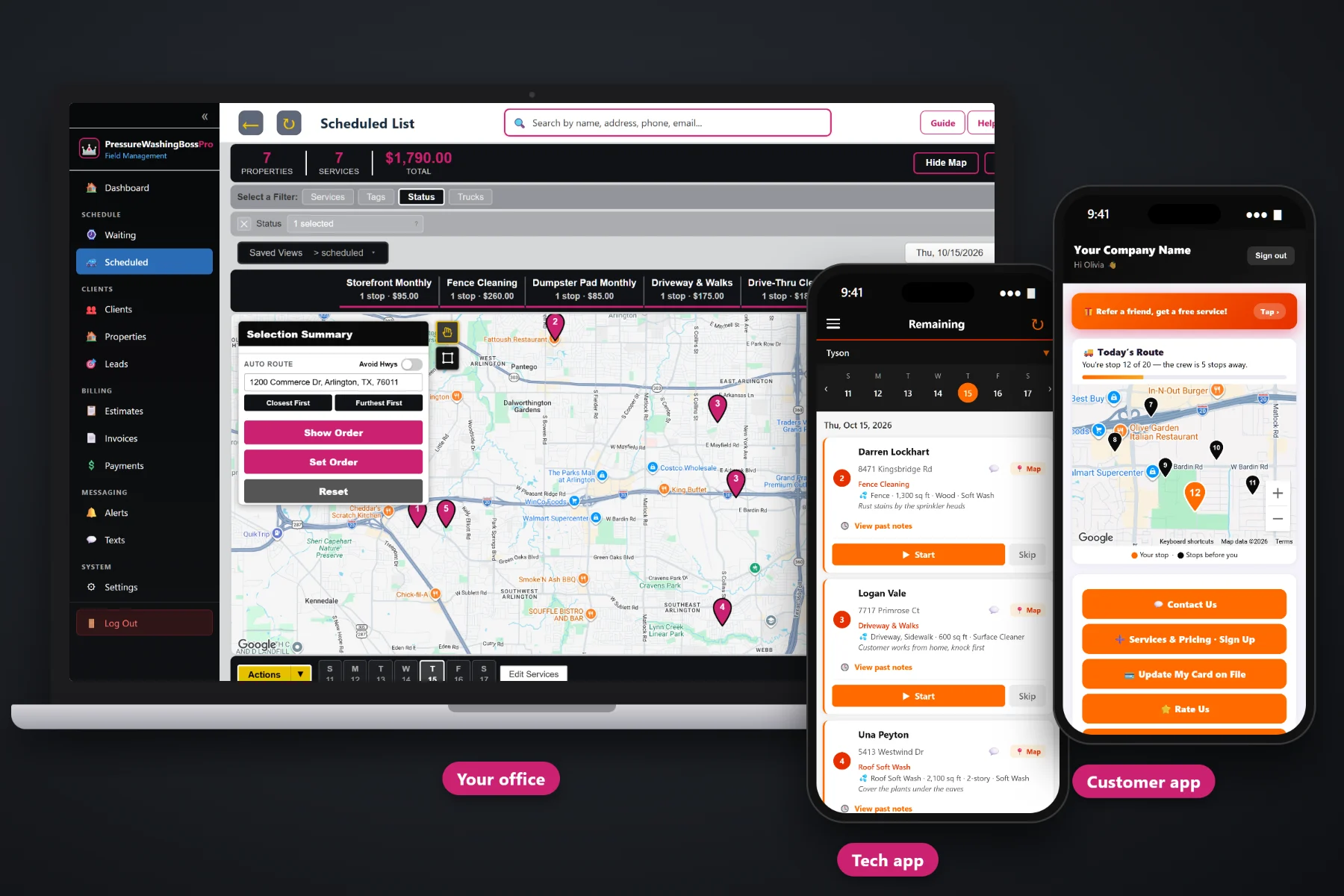
Commercial work is the steady side of a pressure washing company: the same sidewalks every month, the same drive-thru lane, the same dumpster pad, the same HOA pool deck every quarter. PressureWashingBossPro brings each visit due on its own, routes the early-morning and after-close runs, puts the access notes and surfaces on the crew's phone, saves before-and-after photos for the manager, and sends one monthly statement per account covering every location.
Plans start at $59/month, and commercial accounts work on every plan. Recurring visits, route building, proof photos, monthly statements and online bid approval are part of the platform, not add-ons. To see how commercial work fits next to house washes, roof soft washing and driveways, start at PressureWashingBossPro and then come back here for the commercial side.
Storefronts and drive-thrus every 30 days, HOA common areas every 90. Each one lands on the Waiting List when it is due.
Build a route for the hours before stores open or after they close, in the order the rig should run it.
A shopping center, restaurant group or HOA is one client with every address under it.
Before-and-after photos saved with every visit, for the store manager who was not there at 5am.
Accounts set to Monthly get one statement covering every location, each line labeled with the address.
Send the bid, the manager approves it online, and the approved bid becomes the scheduled work.
A commercial stop at 4:30am is no place to guess. Whoever bid the account already wrote down the surfaces, the square feet, the method and the access: where the spigot is, who has the dumpster enclosure key, which lane closes first. PressureWashingBossPro keeps that on the address and shows it on the crew's phone every visit.
Commercial accounts pay off because they repeat. PressureWashingBossPro is built so the setup work happens once, at the bid, and every visit after that comes due, gets routed, gets photographed and gets billed without someone rebuilding it from a spreadsheet each month.
Build the bid from your service list with surfaces and square feet. The manager approves it online and it becomes the scheduled work.
Each location gets its minimum days between visits: 30 for storefronts and drive-thrus, 90 for HOA common areas. Due visits land on the Waiting List.
Assign due visits to the commercial rig, auto-route from the shop, and print or send the route before the crew heads out in the dark.
The crew takes before-and-after photos and taps Complete. At the end of the month, the account gets one statement for every location.
Generic field-service software treats every job as a one-off at one address. A commercial account is a list of locations, each on its own cycle, cleaned in the dark, approved by a manager who never sees the crew, and billed once a month.
Ask any pressure washing owner with a few commercial accounts how they keep track and you will hear about a spreadsheet of locations, a whiteboard of last-cleaned dates, a key ring with tape labels and a monthly scramble to figure out which drive-thrus were actually washed before writing the invoice. Then a regional manager emails asking for proof the dumpster pad at store 14 was done.
All of that belongs on the account. When each location carries its own cycle, surfaces, access and photo history, the visits come due on their own and the statement writes itself.
PressureWashingBossPro keeps the account, the locations, the visits, the photos and the billing in one place, from the bid to the paid statement.
Every tool here exists to keep recurring commercial accounts cleaned on time, proven to the manager and billed without a monthly paperwork marathon.
A shopping center, restaurant group, HOA or apartment owner is one client with every location under it.
30 days for storefronts and drive-thrus, 90 days for HOA common areas, or whatever cycle the contract calls for.
Every due visit on a live map, colored not due yet, due now, or overdue past a 7-day grace.
Assign the commercial rig its own route, auto-route Closest First or Furthest First from the shop, and print route sheets.
Storefront, Sidewalk, Drive-Thru, Dumpster Pad, Parking Garage and Fleet, with square feet and method on every card.
Measure sidewalks, lanes and pads in square feet from the satellite view, then price the bid off those numbers.
Keys, codes, spigot location and who is on site, shown with the job on the crew phone.
Proof of service for managers, saved with the visit on the account.
Bids built from your service list. The manager approves online and the job is scheduled.
Text store and property managers from the office, and keep the thread with the account.
One statement per account per month, every line labeled with its address.
Charge on completion or on a schedule, with past-due follow-up for accounts that run late.
Mark accounts by type, region or contract and store PO numbers or store numbers in custom fields.
See what each account has been billed and paid, and which accounts carry the route.
Runs in the browser on iPhone and Android, with company login plus a personal PIN.
Start $59, Pro $89 and Crew $199 per month, with commercial accounts on every plan.
Commercial work starts on the Waiting List, a live map of every visit that has come due. Monthly storefronts and drive-thrus, quarterly HOA common areas and fleet yard visits come due from each location's minimum days between visits. The office assigns them to the commercial rig and a day, auto-routes from the shop, and the crew's phone shows the same order. For the full walkthrough, read Commercial Pressure Washing Software: The Complete Guide to Running Storefront, Drive-Thru and HOA Accounts.
Most commercial washing happens when nobody from the store is around. That is the point, and it is also why accounts get lost: the manager never sees the crew. Before-and-after photos on every visit, two-way texting with the office, and one clear monthly statement with every location labeled give the manager something to point to when their boss asks what the washing contract is buying.
Pick the plan that fits your operation. Every plan starts with a 14-day free trial and no credit card.
Compare plans on the pricing page.
The recurring commercial work most pressure washing companies run: storefront sidewalks, restaurant drive-thrus, dumpster pads, gas station aprons, parking garages, shopping centers with many suites, HOA common areas and amenity centers, apartment complexes and fleet washing. Each location carries its own surfaces, square feet, method and access notes.
Each location gets a minimum number of days between visits, such as 30 for a storefront or drive-thru and 90 for an HOA common area. When a visit comes due, it shows on the Waiting List map and list. Pins are colored not due yet, due now, or overdue past a 7-day grace, and the office assigns due visits to a rig and a day.
Yes. One client can have many addresses. Set the account to Monthly and it gets one statement each month covering every location, with each line labeled by address, so a restaurant group or shopping center pays once.
The crew takes before-and-after photos in the crew app, and they stay with the visit on the account. The office can text the manager through two-way texting, and the monthly statement lists each location and visit.
Honestly, those are outside the typical use. PressureWashingBossPro is built for owner-run companies with a rig or a few rigs doing recurring commercial and residential work. Very large industrial plants or public contracts with their own bid systems, compliance paperwork and reporting formats usually need more than it offers.
Start is $59/month, Pro is $89/month, and Crew is $199/month. Commercial accounts work on every plan, and every plan starts with a 14-day free trial with no credit card.
Commercial accounts are one piece of how PressureWashingBossPro runs a pressure washing company. For house washes, roof soft washing, estimates, the crew app and billing, see the full PressureWashingBossPro platform overview.
Practical reading on winning and keeping commercial accounts: storefronts, drive-thrus, dumpster pads, gas stations, parking garages, shopping centers, HOAs, apartments, fleets, recurring visits, early routes, proof photos, monthly statements, bids and renewals.
Recurring visits that come due on their own, early-morning routes, proof photos for managers and one monthly statement per account. Try PressureWashingBossPro free for 14 days.